OmniSearch
OmniSearch provides a unified search and command bar in the agent interface. It combines indexed business data with navigation actions and system configuration results.
Elasticsearch and OmniSearch
Elasticsearch/OpenSearch and OmniSearch are related but separate components.
Component |
Responsibility |
|---|---|
Elasticsearch/OpenSearch |
Stores search indices and searches tickets, customers and customer users. |
OmniSearch |
Parses the agent query, applies filters and permissions, groups results and provides the command-bar interface. |
Standard full-text search |
Provides the dedicated search screen and accepts advanced Elasticsearch query syntax. |
OmniSearch does not replace or duplicate the indices. It uses the existing Elasticsearch web service. Navigation actions and system configuration settings are searched without Elasticsearch, so these result groups remain available if the search engine is inactive.
Relevant System Settings
The following settings control OmniSearch:
OmniSearch::ActiveEnables or disables the OmniSearch bar in the agent interface. Disabling it does not disable Elasticsearch or remove any indices.
OmniSearch::FilterMapMaps the aliases that agents type to canonical ticket filters. The standard value provides English and Italian aliases. Alias matching is case-insensitive. Unknown aliases are treated as free text rather than silently discarded.
Elasticsearch::ActiveEnables indexed searches. It is required for ticket, customer and customer-user results, but not for actions or system configuration results.
Elasticsearch::TicketStoreFieldsDefines the ticket fields stored in the index and available to filters. The standard configuration includes ticket number, dates, queue, state, priority, type, owner, responsible, customer, service, SLA and lock data.
Elasticsearch::TicketSearchFieldsDefines the fields used by ticket full-text search, including ticket title and configured article or attachment fields.
Elasticsearch::CustomerCompanyStoreFieldsandElasticsearch::CustomerUserStoreFieldsDefine the customer data stored in the index and displayed directly in OmniSearch results.
The frontend module and JavaScript loader settings are installed with Rexpondo and normally require no manual changes.
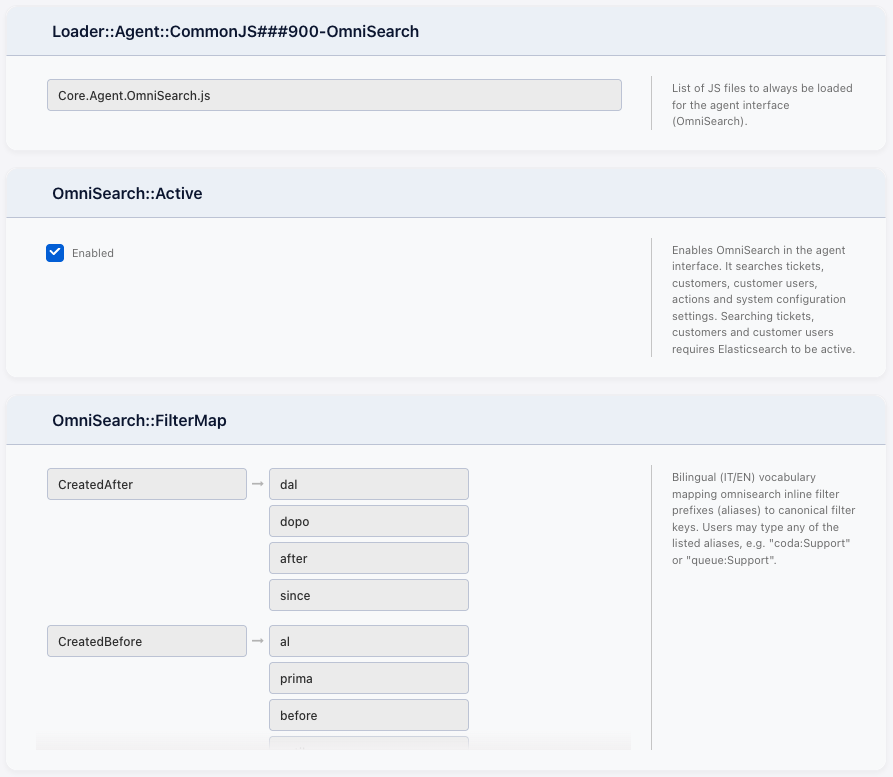
Search for OmniSearch in system configuration to review the installed
settings.
Filter Vocabulary
The default OmniSearch::FilterMap supports these canonical filters:
queue, state, priority and type;
owner and responsible;
customer, service and SLA;
ticket number and title;
created on or after a date;
created on or before a date.
The clickable filter panel shows queue, state, priority and type because these
have a bounded list of selectable values. The other filters can be entered in
the search field. Dates must use the YYYY-MM-DD format.
When changing OmniSearch::FilterMap, preserve the canonical keys. Adding an
alias is a configuration change; introducing a new canonical filter also
requires application support and, when applicable, a corresponding indexed
field.
Permissions
OmniSearch applies the same permissions as the destination screens:
ticket results require access to the ticket module and are restricted to permitted groups and queues;
customer-company and customer-user results require access to their modules;
each navigation action is checked against its module and group permissions;
system configuration results require read-write permission on the
admingroup;the filter panel exposes only queues available to the current agent.
OmniSearch must not be used to grant access. The permissions of the underlying modules, groups and queues remain the source of truth.
Indices and Synchronization
OmniSearch uses these indices:
ticketTickets, articles and, when the ingest attachment feature is available, attachment content.
customerCustomer companies.
customeruserCustomer users.
The Elasticsearch web service keeps the indices synchronized. Its
TicketManagement invoker must include events for ticket creation and
deletion and for changes to customer, queue, title, state, priority, type,
service, SLA, owner, responsible, lock and archive flag.
After changing stored fields, enabling the feature on an existing system or upgrading to a release that adds indexed fields, rebuild the affected indices:
docker exec rexpondo-web-1 perl /opt/otobo/bin/otobo.Console.pl \
  Maint::Elasticsearch::Migration --target tuc
The targets are tickets (t), customer users (u) and customer companies
(c). Use --micro-sleep to reduce load during large migrations. LDAP or
AD backends that limit result counts may require
--use-customer-batches 1 or 2.
If configuration XML files were updated manually, rebuild the system configuration and clear the cache before reindexing:
docker exec rexpondo-web-1 perl /opt/otobo/bin/otobo.Console.pl Maint::Config::Rebuild
docker exec rexpondo-web-1 perl /opt/otobo/bin/otobo.Console.pl Maint::Cache::Delete
Operational Checks
After installation or upgrade:
Verify that the search engine is reachable from the Rexpondo web container.
Verify that the web service named
Elasticsearchexists and is valid.Run the migration and check that it completes without connection errors.
Test ticket, customer and customer-user searches.
Test at least one inline filter and one date range.
Change a ticket field and verify that the indexed result is updated.
Test with agents having different queue and administration permissions.
Troubleshooting
If actions are returned but tickets and customers are missing, check
Elasticsearch::Active, the web-service transport host and search-engine
connectivity.
If unfiltered searches work but an inline filter returns no existing tickets,
rebuild the ticket index and verify Elasticsearch::TicketStoreFields.
If results become stale after ticket changes, verify the events configured on
the TicketManagement invoker and inspect the GenericInterface logs.
Attachment text is searchable only when the selected search engine provides a compatible ingest attachment pipeline. This limitation does not affect ticket, article, customer or customer-user data.