AI Summary
The AI Summary feature produces a concise, language-aware summary of the
whole ticket conversation. Summaries are generated asynchronously by the
Rexpondo daemon through the AI service, stored per (TicketID, Language)
pair and automatically deleted when the ticket changes.
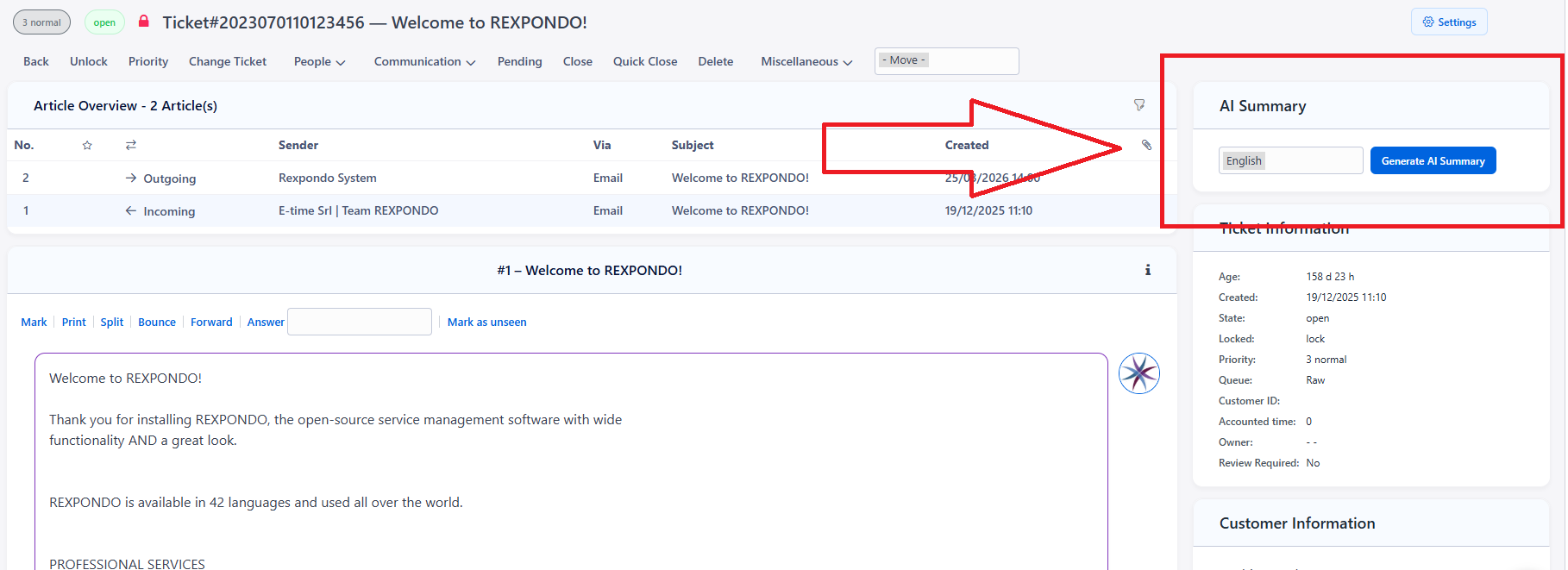
The agent can open the summary widget in the AgentTicketZoom screen, where it appears in the right sidebar. From the widget it is possible to select the desired language and generate a summary of the ticket. If a summary for the selected language already exists, it is displayed immediately without requiring a new generation.
Enable the Feature
Contact E-Time to purchase and activate the AI integration for your subscription.
Set
Frontend::Margot::Summary::Enableto enabled.Deploy the System Configuration.
Settings Reference
SysConfig key |
Default |
Description |
|---|---|---|
|
0 |
Master switch for the ticket-summary feature. |
|
1800 |
Maximum time in seconds a summary generation request may remain in
the |
Lifecycle and Invalidation
Summaries are stored in a table with a state field that can take the values:
creating– a generation task is queued or running;valid– the summary is up to date and shown to the agent.
When the ticket changes — for example when a new article is created or sent — all summaries for every language are automatically deleted, because they are considered obsolete. The agent will need to regenerate the summary for the desired language from the widget.